Batch scanning
Read a multi-page scanned PDF or a whole folder of images in one go. Live scanning with a camera attached to the computer is also possible.
 HazırTest4.0Download HazırTest ↓
HazırTest grades multiple-choice answer sheets from an ordinary document scanner or your phone's camera. Print the sheet on plain paper, enter the answer key, scan the stack — every student's correct, wrong and blank answers, score and report card are ready in seconds.
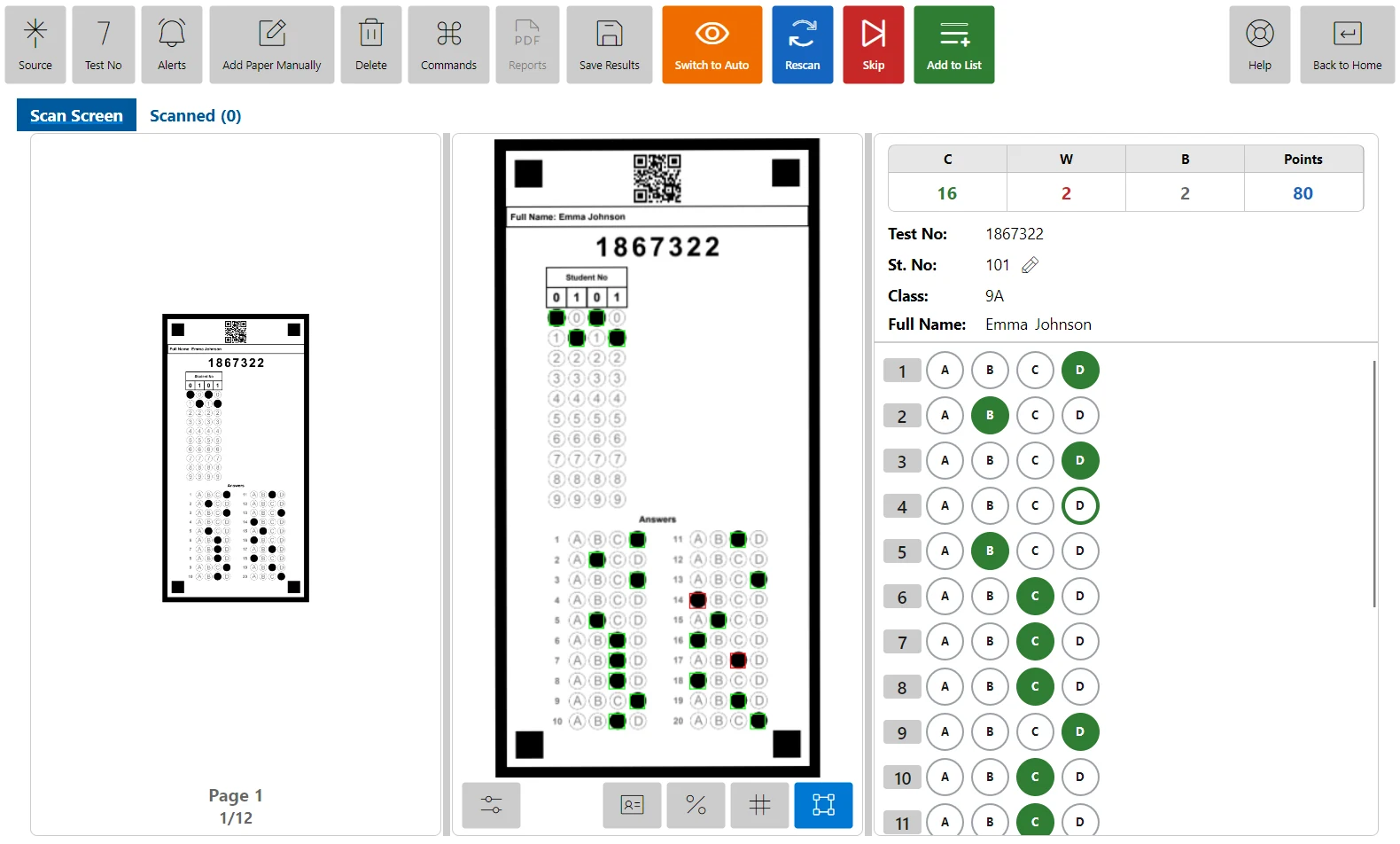
Reading is anchored to the four corner squares of the form, so the sheet prints on a normal printer and can be photocopied. The test number is encoded in the sheet's QR code, so you do not type it in while scanning.
Scanned sheets land on a review screen: if a mark looks doubtful, compare it with the image, fix it and save.
Read a multi-page scanned PDF or a whole folder of images in one go. Live scanning with a camera attached to the computer is also possible.
Erased marks count as blank and double marks are flagged. Sheets that were scanned upside down or sideways are rotated automatically.
Points per question or a fixed total, optional negative marking (for example four wrong answers cancel one correct) and a 50% threshold option.
Score, result and ranking lists; item analysis, statistics and score distribution; class summaries, learning outcome reports and a PDF report card per student.
Results are stored in each student's exam archive, with progress charts and class comparison reports. Mock exam results export to Excel.
No scanner? Use HazırTest Mobile on Android or iOS with the same account; results scanned on the phone sync to the desktop through the cloud.
| Topic | Dedicated OMR machine | HazırTest + scanner or phone |
|---|---|---|
| Hardware | A separate device to buy | The school's scanner, a multifunction printer or a phone |
| Paper | Special pre-printed OMR sheets | Plain A4 paper from any printer, photocopies work |
| Layout | Fixed by the sheet you bought | Generated for each exam, or designed by you |
| Results | Often needs separate reporting software | Scanning, scoring, reports and archive in one app |
No. HazırTest reads answer sheets from ordinary scans (PDF or JPG/PNG images) or from your phone's camera. You print the sheet yourself on plain A4 paper and can photocopy it; the four black corner squares are what the software aligns to.
HazırTest starts free: the free plan includes 100 optical scans a month and 10 test booklets from the question bank (one-time), with no credit card. Yearly plans remove the scan limit and add monthly booklets.
No. HazırTest reads the sheets it produces: answer sheets generated for an exam, the ready-made templates in the app and sheets you design yourself in the Optical Form Designer. Because they print on plain paper, you do not need to buy sheets.
The booklet is detected from the sheet (QR code) and every student is graded against their own booklet's answer key. Shuffled questions are mapped back to one order in the reports, so item analysis still works per question.
Erased marks are treated as blank, answers with more than one mark are flagged separately, and a sheet placed upside down or sideways is turned the right way automatically. Doubtful marks can be checked against the scanned image and corrected before saving.
The app runs on Windows 10/11, macOS (Intel and Apple Silicon) and Linux (Pardus .deb, AppImage); HazırTest Mobile runs on Android and iOS with the same account. The interface is available in 21 languages, and answer sheets can be printed right-to-left for Arabic, Persian and Urdu.
The free plan includes 10 test booklets (one-time) and 100 optical scans a month; no credit card is required. The Windows, macOS, Linux (Pardus), Android and iOS editions work with the same account, and the app is available in 21 languages.
iThe ARM64 build has just been released and is still being tested. If you run into a problem you can try the x64 (Intel / AMD) installer.
iThe ARM64 build has just been released and is still being tested. If you run into a problem you can try the x64 (Intel / AMD) installer.
Question bank, test creation, answer sheet scanning and reports in one application; your phone and computer work with the same account.
Back to the home page →